> ## Documentation Index
> Fetch the complete documentation index at: https://doc2.payloco.com/llms.txt
> Use this file to discover all available pages before exploring further.
# Webhook Signature Verification
> Guide to asynchronous notification signature verification, including creating webhook subscriptions, responding to webhook events, verifying signatures, and IP allowlisting.
# Listen for Webhook Events
Create a webhook subscription, configure your endpoint to respond and verify signatures, and allowlist Payloco IPs to receive webhook notifications. For an overview of how webhooks work, delivery behavior, and security, see the [Webhooks Overview](https://www.payloco.com/docs/developer-tools/webhooks/webhooks-overview.md).
## Before You Begin
You must have the Developer, Admin, or Owner role in the [Payloco Web App](https://global.payloco.com/).
## Create a Webhook Subscription
Subscribe to webhooks by registering a notification URL and selecting the events you want to receive. When one of those events occurs on your account, Payloco sends a JSON payload to your URL via HTTP POST.
Steps to create a webhook subscription:
1. Log in to the [Payloco Web App](https://global.payloco.com/) and go to **Developer** > **Webhooks**.
2. Click **New webhook** and configure the notification URL and the events to listen for.
3. Fill in the following fields on the **Create webhook** page:
* **Name**: The name of your webhook subscription.
* **Notification URL**: The URL to receive webhook notifications.
* **API version**: The API version used by the webhook, which determines the structure of notifications you receive, including event names and payload fields. Defaults to the API version configured for your account.
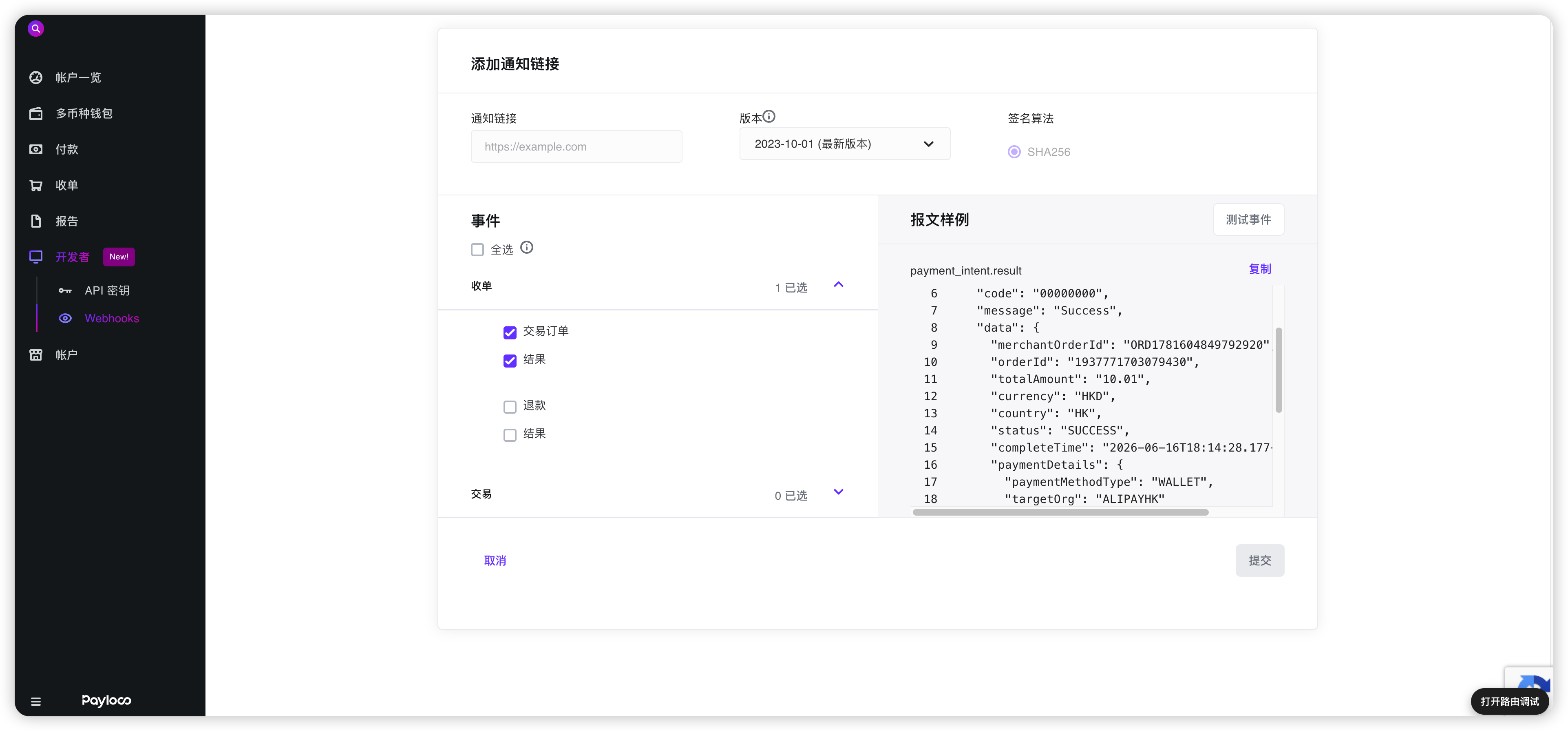 4. Select the events for the webhook to listen for.
5. Click **Submit** to create the webhook subscription.
> **\[Info]**
>
> You can preview a sample payload by selecting an individual webhook event.
## Delivery Headers
HTTP POST payloads sent to your webhook notification URL include the following special headers:
| Header | Description |
| ----------- | -------------------------------------------------------------------------------------------------------------------------------------------------------------------------------- |
| x-timestamp | Unix timestamp in milliseconds, e.g. `1357872222592`. |
| x-signature | HMAC hex digest of the request body. Sent when the webhook is configured with a secret. The digest is generated using the SHA-256 hash function with the secret as the HMAC key. |
## Webhook Payload
The webhook payload is sent as JSON in the POST request body. The full details of the event are included and can be used directly after parsing the JSON into an Event object. The `id` field corresponds to the event ID in the Web App.
The Event object contains the following fields:
| Field | Description |
| ------------ | ------------------------------------------------------------------------------------------------------------- |
| `orderId` | Unique identifier for the event. |
| `name` | Event type, e.g. `payment_attempt.authorized`. |
| `merchantId` | Unique identifier of the merchant this event belongs to. |
| `data` | Contains business information that varies by event type. See individual event type pages for sample payloads. |
| `notifyTime` | Time the event was created. |
```json theme={null}
{
"code": "00000000",
"message": "Success",
"traceId": "85776c0dc17b4911bc38f6c24bf98504",
"merchantId": "851244000040",
"notifyTime": "2026-06-16T18:14:28.26137491+08:00",
"notifyType": "PAYMENT",
"data": {
"merchantOrderId": "ORD1781604849792920",
"orderId": "1937771703079430",
"totalAmount": "10.01",
"currency": "HKD",
"country": "HK",
"status": "SUCCESS",
"completeTime": "2026-06-16T18:14:28.177+08:00",
"paymentDetails": {
"paymentMethodType": "WALLET",
"targetOrg": "ALIPAYHK"
},
"reference": "goods reference",
"cashierCountry": "HK"
}
}
```
## Respond to Webhook Events
Your endpoint must acknowledge all notifications by returning an HTTP `200 OK` status code with the following response body. If Payloco does not receive a `200 OK` response (due to timeout or any other status code), the delivery is considered failed and will be retried. To prevent timeouts, send the response **immediately**.
```json theme={null}
{
"code": "00000000",
"message": "Success"
}
```
## Verify Webhook Signatures
Payloco attaches a signature to the webhook request header sent to your notification URL so you can verify that the event was sent by Payloco.
Before verifying signatures, retrieve the secret key for your notification URL from the Web App. Each secret is uniquely bound to its corresponding URL. Once configured, Payloco will sign every webhook sent to that URL.
4. Select the events for the webhook to listen for.
5. Click **Submit** to create the webhook subscription.
> **\[Info]**
>
> You can preview a sample payload by selecting an individual webhook event.
## Delivery Headers
HTTP POST payloads sent to your webhook notification URL include the following special headers:
| Header | Description |
| ----------- | -------------------------------------------------------------------------------------------------------------------------------------------------------------------------------- |
| x-timestamp | Unix timestamp in milliseconds, e.g. `1357872222592`. |
| x-signature | HMAC hex digest of the request body. Sent when the webhook is configured with a secret. The digest is generated using the SHA-256 hash function with the secret as the HMAC key. |
## Webhook Payload
The webhook payload is sent as JSON in the POST request body. The full details of the event are included and can be used directly after parsing the JSON into an Event object. The `id` field corresponds to the event ID in the Web App.
The Event object contains the following fields:
| Field | Description |
| ------------ | ------------------------------------------------------------------------------------------------------------- |
| `orderId` | Unique identifier for the event. |
| `name` | Event type, e.g. `payment_attempt.authorized`. |
| `merchantId` | Unique identifier of the merchant this event belongs to. |
| `data` | Contains business information that varies by event type. See individual event type pages for sample payloads. |
| `notifyTime` | Time the event was created. |
```json theme={null}
{
"code": "00000000",
"message": "Success",
"traceId": "85776c0dc17b4911bc38f6c24bf98504",
"merchantId": "851244000040",
"notifyTime": "2026-06-16T18:14:28.26137491+08:00",
"notifyType": "PAYMENT",
"data": {
"merchantOrderId": "ORD1781604849792920",
"orderId": "1937771703079430",
"totalAmount": "10.01",
"currency": "HKD",
"country": "HK",
"status": "SUCCESS",
"completeTime": "2026-06-16T18:14:28.177+08:00",
"paymentDetails": {
"paymentMethodType": "WALLET",
"targetOrg": "ALIPAYHK"
},
"reference": "goods reference",
"cashierCountry": "HK"
}
}
```
## Respond to Webhook Events
Your endpoint must acknowledge all notifications by returning an HTTP `200 OK` status code with the following response body. If Payloco does not receive a `200 OK` response (due to timeout or any other status code), the delivery is considered failed and will be retried. To prevent timeouts, send the response **immediately**.
```json theme={null}
{
"code": "00000000",
"message": "Success"
}
```
## Verify Webhook Signatures
Payloco attaches a signature to the webhook request header sent to your notification URL so you can verify that the event was sent by Payloco.
Before verifying signatures, retrieve the secret key for your notification URL from the Web App. Each secret is uniquely bound to its corresponding URL. Once configured, Payloco will sign every webhook sent to that URL.
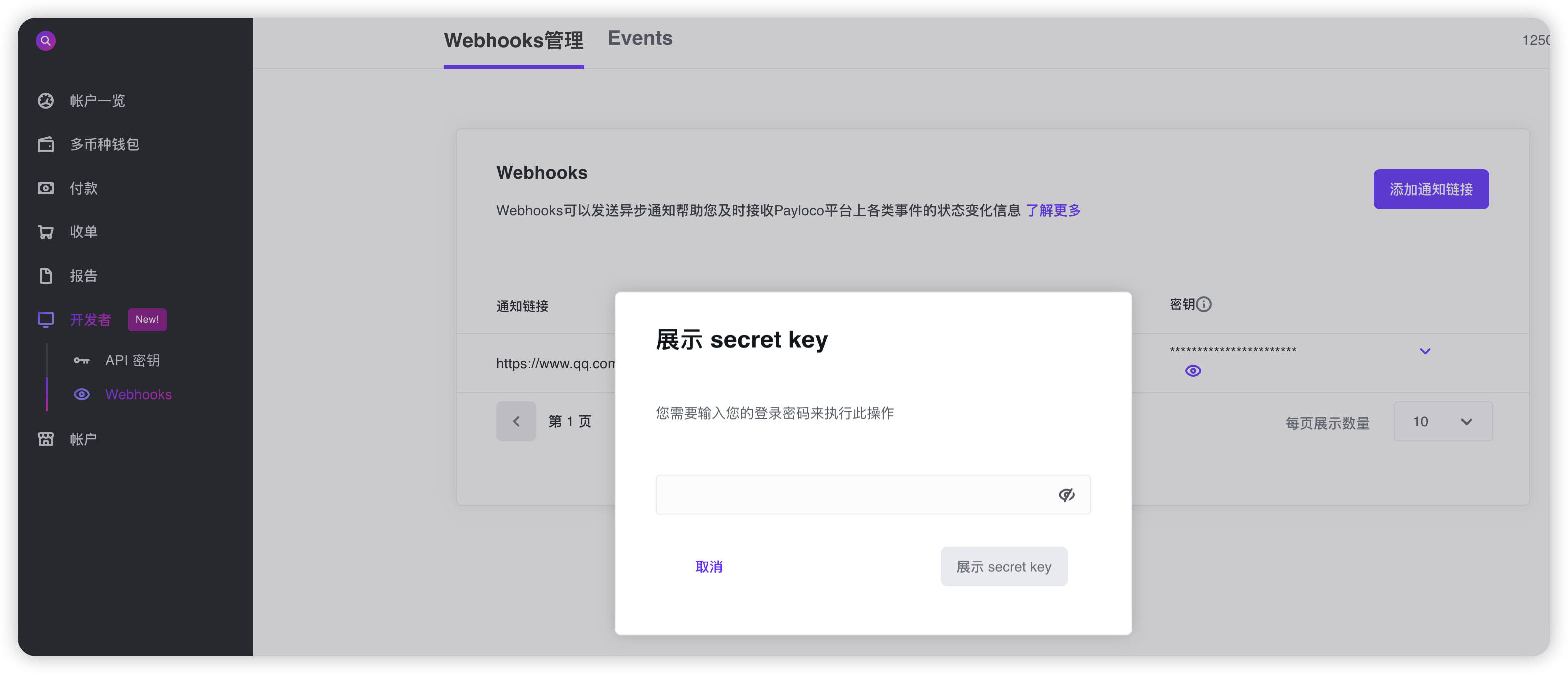 > **\[Important]**
>
> Webhook signatures for test events are generated using the secret key provided in the `client-secret-key` header of the test event payload.
Follow these steps to verify the signature:
1. Extract **`x-timestamp`** and **`x-signature`** from the headers.
2. Prepare the **`value_to_digest`** string by concatenating **`x-timestamp`** (as a string) and the raw JSON payload (request body string).
3. Compute the [HMAC](https://en.wikipedia.org/wiki/Hash-based_message_authentication_code) using the [SHA-256](https://en.wikipedia.org/wiki/SHA-2) hash function, with the notification URL's secret key as the key and `value_to_digest` as the message.
4. Compare **`x-signature`** from the header with the computed signature. If they match, calculate the difference between the current timestamp and the received timestamp, and check whether it falls within your tolerance window.
If signature verification fails, check these common causes:
* **Use the raw JSON payload**: Always use the original, unmodified request body when computing the signature. Do not use a JSON object that has been parsed and re-serialized, as this may alter formatting (whitespace, key order, etc.) and produce a different signature.
* **Verify before parsing**: Many JSON libraries automatically format or normalize JSON payloads. Verify the signature before parsing or transforming the body.
* **Check the timestamp format**: Use the `x-timestamp` value exactly as received in the header — no conversion or reformatting.
* **Use the correct secret key**: Confirm you are using the secret key associated with the notification URL receiving the webhook. Each webhook subscription has its own unique secret key.
* **Check concatenation order**: The `value_to_digest` string must be constructed in the exact order: `x-timestamp` (string) followed by the raw JSON payload body.
### Code Examples
The following examples show how to verify the signature and return `200` on success or `400` on failure, using Java, PHP, and Node.js.
```java theme={null}
import org.apache.commons.codec.digest.HmacAlgorithms;
import org.apache.commons.codec.digest.HmacUtils;
import org.springframework.http.HttpStatus;
import org.springframework.http.ResponseEntity;
import org.springframework.stereotype.Controller;
import org.springframework.web.bind.annotation.PostMapping;
import org.springframework.web.bind.annotation.RequestBody;
import org.springframework.web.bind.annotation.ResponseBody;
import javax.servlet.http.HttpServletRequest;
import javax.servlet.http.HttpServletResponse;
import java.util.HashMap;
import java.util.Map;
@Controller
public class WebhookExampleController {
@PostMapping("/webhook/example")
@ResponseBody
public ResponseEntity> receive(HttpServletRequest request,
@RequestBody String payload,
HttpServletResponse response) {
String timestamp = request.getHeader("x-timestamp");
String signature = request.getHeader("x-signature");
String secret = getSecret();
StringBuilder valueToDigest = new StringBuilder();
valueToDigest.append(timestamp).append(payload);
HmacUtils hmacUtils = new HmacUtils(HmacAlgorithms.HMAC_SHA_256, secret);
if (hmacUtils.hmacHex(valueToDigest.toString()).equals(signature)) {
// Signature verification successful.
Map successResponse = new HashMap<>();
successResponse.put("code", "00000000");
successResponse.put("message", "Success");
return ResponseEntity.ok(successResponse);
} else {
// Signature verification failed.
Map errorResponse = new HashMap<>();
errorResponse.put("code", "00000001"); // Error codes can be defined as needed.
errorResponse.put("message", "failed to verify the signature");
return ResponseEntity
.status(HttpStatus.BAD_REQUEST)
.body(errorResponse);
}
}
private String getSecret() {
// TODO: Retrieve from the configuration center or environment variables. secret
return "your-secret-key";
}
}
```
```php theme={null}
getHeaderLine('x-timestamp');
$body = $request->getBody()->getContents();
$signature = $request->getHeaderLine('x-signature');
$secret = getSecret();
// Verify signature
if (hash_hmac('sha256', $timestamp . $body, $secret) !== $signature) {
$errorResponse = json_encode([
'code' => '00000001', // Error codes can be defined as needed
'message' => 'failed to verify the signature'
], JSON_UNESCAPED_UNICODE);
return new Response(400, [
'Content-Type' => 'application/json'
], $errorResponse);
}
// Signature verification successful
$successResponse = json_encode([
'code' => '00000000',
'message' => 'Success'
], JSON_UNESCAPED_UNICODE);
return new Response(200, [
'Content-Type' => 'application/json'
], $successResponse);
}
```
```javascript theme={null}
// Koa
const crypto = require('crypto');
const secret = '';
async function webhookController(ctx, next) {
const { headers } = ctx.request;
// Important: Use the raw body string (do not use the parsed object).
const rawBody = ctx.request.rawBody
?? (typeof ctx.request.body === 'string' ? ctx.request.body : JSON.stringify(ctx.request.body));
const ts = headers['x-timestamp'];
const signature = headers['x-signature'];
const valueToDigest = `${ts}${rawBody}`;
const signatureHex = crypto.createHmac('sha256', secret)
.update(valueToDigest)
.digest('hex');
if (signatureHex === signature) {
// Signature verification successful
ctx.status = 200;
ctx.body = {
code: "00000000",
message: "Success"
};
// If there are other middleware functions to execute, you can continue with next(), but generally webhooks don't require this
// return next();
} else {
// Signature verification failed
ctx.status = 400;
ctx.body = {
code: "00000001", // Error codes can be defined as needed
message: "failed to verify webhook signature"
};
}
}
module.exports = webhookController;
```
## Allowlist IP Addresses
Payloco sends webhook calls from one of the following IP addresses. You must allowlist these IPs to successfully receive webhook calls:
**Production**
* 47.76.49.81
* 43.154.97.39
* 47.238.131.34
**Sandbox**
* 47.242.161.23
* 47.76.76.39
For guidance on HTTPS, retries, immediate event acknowledgment, handling duplicate events, and event ordering, see the [Webhooks Overview](https://www.payloco.com/docs/developer-tools/webhooks/webhooks-overview.md).
## Next Steps
Now that you can receive and verify webhooks, you can:
* [View and re-trigger webhook events](https://www.payloco.com/docs/developer-tools/webhooks/view-and-re-trigger-webhook-events.md) to inspect and redeliver events in the Web App.
* Browse [event types and payload examples](https://www.payloco.com/docs/developer-tools/webhooks/listen-for-webhook-events.md) by product.
> **\[Important]**
>
> Webhook signatures for test events are generated using the secret key provided in the `client-secret-key` header of the test event payload.
Follow these steps to verify the signature:
1. Extract **`x-timestamp`** and **`x-signature`** from the headers.
2. Prepare the **`value_to_digest`** string by concatenating **`x-timestamp`** (as a string) and the raw JSON payload (request body string).
3. Compute the [HMAC](https://en.wikipedia.org/wiki/Hash-based_message_authentication_code) using the [SHA-256](https://en.wikipedia.org/wiki/SHA-2) hash function, with the notification URL's secret key as the key and `value_to_digest` as the message.
4. Compare **`x-signature`** from the header with the computed signature. If they match, calculate the difference between the current timestamp and the received timestamp, and check whether it falls within your tolerance window.
If signature verification fails, check these common causes:
* **Use the raw JSON payload**: Always use the original, unmodified request body when computing the signature. Do not use a JSON object that has been parsed and re-serialized, as this may alter formatting (whitespace, key order, etc.) and produce a different signature.
* **Verify before parsing**: Many JSON libraries automatically format or normalize JSON payloads. Verify the signature before parsing or transforming the body.
* **Check the timestamp format**: Use the `x-timestamp` value exactly as received in the header — no conversion or reformatting.
* **Use the correct secret key**: Confirm you are using the secret key associated with the notification URL receiving the webhook. Each webhook subscription has its own unique secret key.
* **Check concatenation order**: The `value_to_digest` string must be constructed in the exact order: `x-timestamp` (string) followed by the raw JSON payload body.
### Code Examples
The following examples show how to verify the signature and return `200` on success or `400` on failure, using Java, PHP, and Node.js.
```java theme={null}
import org.apache.commons.codec.digest.HmacAlgorithms;
import org.apache.commons.codec.digest.HmacUtils;
import org.springframework.http.HttpStatus;
import org.springframework.http.ResponseEntity;
import org.springframework.stereotype.Controller;
import org.springframework.web.bind.annotation.PostMapping;
import org.springframework.web.bind.annotation.RequestBody;
import org.springframework.web.bind.annotation.ResponseBody;
import javax.servlet.http.HttpServletRequest;
import javax.servlet.http.HttpServletResponse;
import java.util.HashMap;
import java.util.Map;
@Controller
public class WebhookExampleController {
@PostMapping("/webhook/example")
@ResponseBody
public ResponseEntity> receive(HttpServletRequest request,
@RequestBody String payload,
HttpServletResponse response) {
String timestamp = request.getHeader("x-timestamp");
String signature = request.getHeader("x-signature");
String secret = getSecret();
StringBuilder valueToDigest = new StringBuilder();
valueToDigest.append(timestamp).append(payload);
HmacUtils hmacUtils = new HmacUtils(HmacAlgorithms.HMAC_SHA_256, secret);
if (hmacUtils.hmacHex(valueToDigest.toString()).equals(signature)) {
// Signature verification successful.
Map successResponse = new HashMap<>();
successResponse.put("code", "00000000");
successResponse.put("message", "Success");
return ResponseEntity.ok(successResponse);
} else {
// Signature verification failed.
Map errorResponse = new HashMap<>();
errorResponse.put("code", "00000001"); // Error codes can be defined as needed.
errorResponse.put("message", "failed to verify the signature");
return ResponseEntity
.status(HttpStatus.BAD_REQUEST)
.body(errorResponse);
}
}
private String getSecret() {
// TODO: Retrieve from the configuration center or environment variables. secret
return "your-secret-key";
}
}
```
```php theme={null}
getHeaderLine('x-timestamp');
$body = $request->getBody()->getContents();
$signature = $request->getHeaderLine('x-signature');
$secret = getSecret();
// Verify signature
if (hash_hmac('sha256', $timestamp . $body, $secret) !== $signature) {
$errorResponse = json_encode([
'code' => '00000001', // Error codes can be defined as needed
'message' => 'failed to verify the signature'
], JSON_UNESCAPED_UNICODE);
return new Response(400, [
'Content-Type' => 'application/json'
], $errorResponse);
}
// Signature verification successful
$successResponse = json_encode([
'code' => '00000000',
'message' => 'Success'
], JSON_UNESCAPED_UNICODE);
return new Response(200, [
'Content-Type' => 'application/json'
], $successResponse);
}
```
```javascript theme={null}
// Koa
const crypto = require('crypto');
const secret = '';
async function webhookController(ctx, next) {
const { headers } = ctx.request;
// Important: Use the raw body string (do not use the parsed object).
const rawBody = ctx.request.rawBody
?? (typeof ctx.request.body === 'string' ? ctx.request.body : JSON.stringify(ctx.request.body));
const ts = headers['x-timestamp'];
const signature = headers['x-signature'];
const valueToDigest = `${ts}${rawBody}`;
const signatureHex = crypto.createHmac('sha256', secret)
.update(valueToDigest)
.digest('hex');
if (signatureHex === signature) {
// Signature verification successful
ctx.status = 200;
ctx.body = {
code: "00000000",
message: "Success"
};
// If there are other middleware functions to execute, you can continue with next(), but generally webhooks don't require this
// return next();
} else {
// Signature verification failed
ctx.status = 400;
ctx.body = {
code: "00000001", // Error codes can be defined as needed
message: "failed to verify webhook signature"
};
}
}
module.exports = webhookController;
```
## Allowlist IP Addresses
Payloco sends webhook calls from one of the following IP addresses. You must allowlist these IPs to successfully receive webhook calls:
**Production**
* 47.76.49.81
* 43.154.97.39
* 47.238.131.34
**Sandbox**
* 47.242.161.23
* 47.76.76.39
For guidance on HTTPS, retries, immediate event acknowledgment, handling duplicate events, and event ordering, see the [Webhooks Overview](https://www.payloco.com/docs/developer-tools/webhooks/webhooks-overview.md).
## Next Steps
Now that you can receive and verify webhooks, you can:
* [View and re-trigger webhook events](https://www.payloco.com/docs/developer-tools/webhooks/view-and-re-trigger-webhook-events.md) to inspect and redeliver events in the Web App.
* Browse [event types and payload examples](https://www.payloco.com/docs/developer-tools/webhooks/listen-for-webhook-events.md) by product.